Instant cheat access is defined as receiving a working license or download link the moment your payment clears, with full activation typically completed within a few minutes. When you access game cheats immediately after purchase, the transaction itself is the fast part. The real work is the short setup sequence that follows: matching your trainer to your game build, running the injector with the right permissions, and toggling cheats through an overlay or hotkey menu. Tools like Cheat Happens, AurorAI, and Playback have each built their delivery models around reducing that gap. This guide walks you through every step, from prerequisites to activation to troubleshooting.
What do you need before you can access game cheats immediately after purchase?
Cheat access speed is less about payment processing and more about technical compatibility and user setup. Before you even launch a trainer, three things must be true: your game version matches the cheat build, your system allows the software to run with elevated permissions, and your antivirus is not blocking the injector.
Cheat tool types and what each one requires
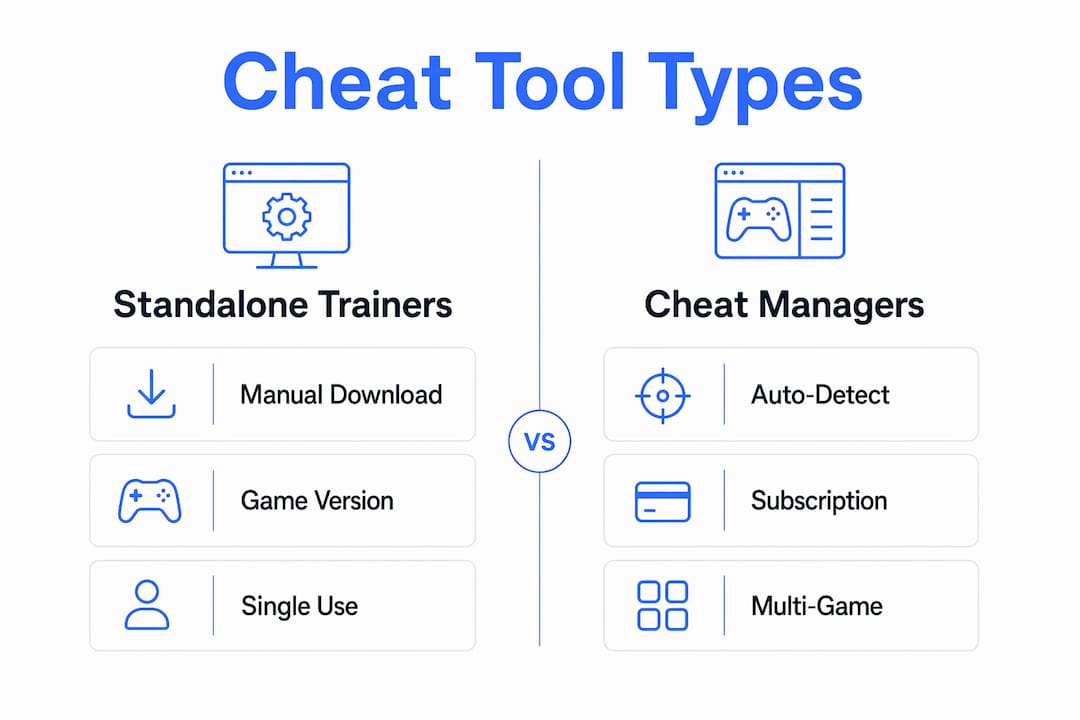
The three main delivery formats are standalone trainers, cheat managers, and emulator cheat menus. Each has a different setup burden.

Standalone trainers are single executable files tied to one game version. You download them manually, run them as administrator, and launch your game. If your game updates overnight, the trainer breaks until a new version ships.
Cheat managers like AurorAI and Cheat Happens Premium auto-detect your installed games and pull the correct trainer automatically. AurorAI links to a large cheat database, updates trainers automatically, and even controls them via a mobile companion app on a second screen or a Steam Deck. That removes the version-hunting step entirely.
Emulator cheat menus work differently. The Cheat Codes option in emulators only appears after a game is loaded, so you cannot pre-configure cheats before your session starts.
| Tool type | Setup burden | Best for |
|---|---|---|
| Standalone trainer | Manual download, version matching | Single game, specific build |
| Cheat manager (AurorAI, Cheat Happens) | Auto-detection, auto-update | Multi-game libraries |
| Emulator cheat menu | Requires active game session | Retro or emulated titles |
Pro Tip: Add your cheat manager's install folder to your antivirus whitelist before purchasing anything. Blocking the injector at runtime is the single most common cause of "it's not working" reports.
How to activate cheats right after buying: step by step
Instant delivery means your license is provided immediately, but operational cheat use requires a few additional steps that typically take a few minutes. Here is the exact sequence.
-
Check your email or account dashboard. Most platforms send a license key or subscription confirmation within seconds of payment. Log in to your account on the cheat platform and confirm the license is active before doing anything else.
-
Download the trainer or cheat manager. For standalone cheats, download the specific file listed for your game version. For cheat managers like Cheat Happens Premium, install the client once. Cheat Happens Premium provides access to 27,000+ trainers for over 6,000 games, so the client handles version matching for you.
-
Run the software as administrator. Right-click the executable and select "Run as administrator." Running cheat injectors as administrator is a standard procedural requirement. Skipping this step is the second most common cause of failed activation.
-
Launch your game. Start the game through its normal launcher. Do not use a modified shortcut or a third-party launcher unless the cheat documentation specifically says to.
-
Attach or inject the cheat. In a cheat manager, the trainer attaches automatically once the game process is detected. In a standalone injector, click "Inject" or "Attach" after the game's main menu loads. Wait for the confirmation message before proceeding.
-
Activate cheats via hotkeys or overlay. Most trainers use function keys or number keys to toggle individual cheats. Open the overlay (usually F1 or a designated hotkey listed in the trainer UI) and enable the options you want.
-
Confirm cheats are active in-game. Test one low-risk cheat first, such as infinite stamina, before enabling anything that affects other players or triggers anti-cheat flags.
Pro Tip: Save your game manually before toggling any cheat for the first time. Some cheats alter save data in ways that cannot be reversed without a clean save file.
Troubleshooting common issues when getting cheats right away
Most problems that block quick cheat code access fall into four categories. Identifying which one applies cuts resolution time significantly.
-
Cheat menu not visible. If you are using an emulator, the cheat option does not appear until a game ROM is fully loaded. This is expected behavior, not a bug. Load the game first, then navigate to the cheat menu.
-
Version mismatch. A trainer built for game version 1.4.2 will not attach to version 1.5.0. Check the trainer's listed game version against your installed build. Cheat managers like AurorAI handle this automatically, which is the main reason experienced gamers prefer them over standalone files.
-
Antivirus or anti-cheat blocking the injector. Anti-cheat detection can lead to account sanctions or hardware bans, so anti-cheat systems are aggressive by design. If your injector closes immediately after launch, your antivirus quarantined it. Restore the file from quarantine and add a whitelist exception before trying again.
-
Cheat cannot be toggled off. Some emulator cheats apply changes that only a full game restart can reset. If you enabled a cheat and cannot disable it mid-session, save your progress, exit to the main menu, and restart the game. The cheat will be off by default on the next load unless you re-enable it.
Key rule: Always match your trainer version to your exact game build. Version mismatches account for the majority of "cheat not working" reports and are fully preventable with a 30-second version check before purchase.
Standalone trainers vs. cheat managers vs. emulator cheats: which delivers faster?
The delivery model you choose has a direct impact on how fast you can download cheats after purchase and get them running. Each model has a real tradeoff between setup speed and long-term convenience.
Standalone trainers give you a single file with no subscription required. The downside is manual everything: finding the right version, downloading it, and repeating the process after every game patch. For a gamer who plays one game and rarely updates it, this works fine. For anyone managing a library of titles, it becomes a maintenance burden.
Cheat managers are the fastest path to instant game cheat access across multiple games. AurorAI uses AI to find and manage trainers automatically, removing the manual hunting step. Cheat Happens Premium takes a similar approach, with unlimited access to 27,000+ trainers updated daily. After the initial client install, activating a cheat for a new game takes under two minutes.
Emulator cheat menus are the slowest for first-time activation because the Cheat Codes option only appears after a game is loaded. They also carry the toggle limitation: cheats that are enabled mid-session often cannot be turned off without restarting. That makes them unsuitable for quick testing or rapid adjustments.
| Delivery model | First activation speed | Post-patch maintenance | Toggle flexibility |
|---|---|---|---|
| Standalone trainer | Moderate (manual setup) | High effort | Good |
| Cheat manager | Fast (auto-detection) | Low effort | Good |
| Emulator cheat menu | Slow (game must load first) | Low effort | Limited |
For competitive titles like EFT or Valorant, cheat managers are the clear choice. They reduce setup time, handle updates automatically, and give you a consistent activation experience regardless of game patches.
Key Takeaways
The fastest path to working cheats is a cheat manager with auto-detection, not a standalone file, because version matching and injection happen automatically after the license is confirmed.
| Point | Details |
|---|---|
| License delivery is instant | Payment confirmation triggers immediate license or download access on most platforms. |
| Setup takes a few minutes | Version matching, admin permissions, and injection add time beyond the purchase itself. |
| Cheat managers beat standalone files | Tools like AurorAI and Cheat Happens auto-update trainers, cutting activation time significantly. |
| Admin rights are non-negotiable | Running injectors without administrator privileges is the most common cause of failed activation. |
| Emulator cheats have toggle limits | Some emulator cheats cannot be disabled mid-session and require a full game restart to revert. |
What I have learned about cheat activation speed after years of testing
The biggest misconception I see is that "instant delivery" means instant gameplay advantage. It does not. The license arrives instantly. The cheat working correctly takes a few more minutes, and that gap is entirely within your control.
My honest recommendation: use a cheat manager over a standalone trainer every time. The auto-detection alone saves more time per session than any other single change. I have watched gamers spend 20 minutes hunting for the right standalone trainer version when a cheat manager would have found and loaded it in under 90 seconds.
The other thing I would push back on is the instinct to rush past the version check. Matching trainer software to your exact game build is the step that determines whether your cheat works at all. Skipping it does not save time. It costs you a full reinstall cycle.
On the anti-cheat side, kernel-level detection and hardware-level restrictions are real. The platforms that test their cheats daily against live anti-cheat builds are the ones worth trusting. A cheat that was undetected last week may not be undetected today. That is not alarmism. It is just how the cat-and-mouse cycle works, and it is why daily testing matters more than any marketing claim.
— Fonics
Midnight-market makes fast cheat activation straightforward
Midnight-market is built for gamers who want to get game cheats right away without spending an hour on setup. Every product in the Midnight-market store ships with an instant license on payment confirmation, and the platform covers popular competitive titles including EFT and Valorant.
Daily testing keeps every cheat current against live anti-cheat builds, which means the version you activate today is the version that actually works today. Live Discord support is available if anything in the activation sequence does not go as expected. Hardware solutions and DMA cards are also stocked for gamers who want a deeper layer of protection. Visit Midnight-market to see the full catalog and get your license within minutes of purchase.
FAQ
How fast can I access cheats after buying?
Most platforms generate your license instantly on payment confirmation. Full activation, including version matching and injection, typically takes a few minutes.
Why is my cheat not showing up after purchase?
The most common cause is a version mismatch between the trainer and your installed game build. Confirm both versions match before launching the injector.
Do I need to run cheats as administrator?
Yes. Running cheat injectors without administrator privileges prevents proper injection and is the leading cause of activation failure on first use.
Can I turn off a cheat after enabling it?
Yes, in most trainer-based tools you can toggle cheats off via hotkey at any time. Emulator cheat menus are the exception: some changes require a full game restart to revert.
Does anti-cheat software block immediate cheat access?
Anti-cheat systems can block or flag injectors at the kernel level, which delays activation and risks account sanctions. Using cheats that are tested daily against current anti-cheat builds reduces this risk significantly.