
Getting cheats without long wait times means using validated game trainers, cheat code databases, and memory editing tools that remove cooldowns and delays the moment you activate them. Competitive gamers waste real time sitting through energy bars, repair timers, and conversation cooldowns that serve no purpose once you know how to bypass them. The right tools give you instant cheat access without web searches, sketchy downloads, or waiting for a page to load. This guide covers the exact methods, tools, and safety steps that let you pull fast game cheats reliably and keep them working through patches.
How to get cheats without long wait times
The fastest path to immediate cheat solutions runs through three categories: game trainers, cheat code databases, and memory editing tools. Each one works differently, and each fits a different skill level and game type.
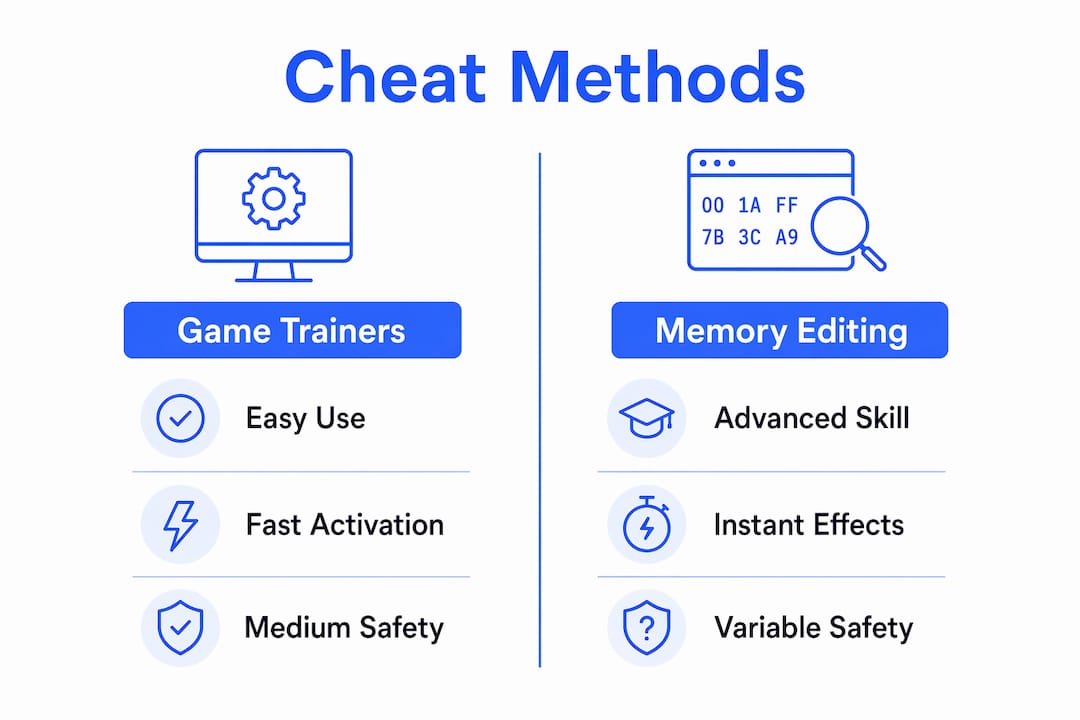
Game trainers are standalone programs that hook into a running game's memory and toggle cheats via hotkeys. Validated trainers updated for mid-2026 patches typically include 10–15 memory-driven features, covering instant repair, unlimited currency, and no-wait toggles, all without leaving the game window. That range means one trainer often replaces five separate searches.

Cheat code databases like Cheatbook take a different approach. Cheatbook aggregates cheats for over 485 PC games and 46 console titles in a single monthly issue. You download it once and search offline, which cuts retrieval time to seconds.
Memory editing tools like Cheat Engine let you scan a game's live memory, find the value tied to a timer or resource, and change it directly. This method requires more setup but gives you the most control over what gets modified and when.
| Tool category | Ease of use | Speed of activation | Safety level |
|---|---|---|---|
| Game trainers | High | Instant via hotkey | High (trusted sources) |
| Cheat databases | Very high | Instant (offline) | High (no execution) |
| Memory editors | Low to medium | Fast after setup | Medium (requires care) |
| Unverified scripts | Low | Variable | Low |
Pro Tip: Always cross-reference a trainer's version number against your current game patch before downloading. A version mismatch is the most common reason cheats fail or crash the game.
How to safely download and use game trainers
Game trainers are the most practical tool for competitive gamers who want quick cheat codes without manual memory work. The setup process matters as much as the trainer itself.
- Find a version-matched trainer. Match the trainer version to your exact game build. A trainer built for patch 1.4 will not work correctly on patch 1.5 and may cause crashes.
- Download from a trusted source. Dedicated trainer applications with memory hooking provide more reliable cheat experiences than unverified online scripts. Stick to well-known trainer repositories with active update logs.
- Launch the game first. Start the game and load into a session before opening the trainer. Launching the trainer as Administrator after the game is running improves stability by hooking into the active memory process correctly.
- Run the trainer as Administrator. Right-click the trainer executable and select "Run as administrator." This gives the trainer the permissions it needs to write to game memory.
- Learn the hotkeys before you need them. Most trainers use F1 through F12 as toggle keys. Check the trainer's key list before a match so you are not fumbling through menus mid-game.
- Test in a private session first. Activate each cheat in a solo or offline session before using it in a competitive context. This confirms the feature works and shows you any visual indicators the trainer uses.
- Watch for instability signs. If the game stutters, freezes, or throws error messages after activation, disable the trainer and restart. Do not push through instability.
Pro Tip: After any game update, recheck your trainer before your next session. Patches frequently shift memory addresses, which breaks trainer functions until the developer pushes an update.
Using cheat databases for immediate cheat retrieval
Cheat code databases solve a specific problem: you need a working code right now, and you do not want to spend ten minutes sifting through forum threads and dead links. Offline databases eliminate that friction entirely.
Cheatbook's monthly issues are the clearest example of this approach. The july 2026 issue covers hundreds of titles across PC and console platforms, all searchable from a single local file. You open it, type the game name, and get the code in under ten seconds. No ads, no paywalls, no waiting for a server response.
- Download the full monthly issue rather than searching individual game pages. The bulk download gives you offline access to every title in that release.
- Use the built-in search function to find your game by exact title. Partial matches work, but exact titles return results faster.
- Save codes to a local text file organized by game. A simple folder structure (game name, then patch version) means you find the right code in seconds during a session.
- Note the platform tag next to each code. PC and console versions of the same game often use different codes, and applying the wrong one wastes time.
- Check the issue date against your game version. Codes from older issues may not work on updated builds. The monthly release cycle keeps most entries current.
UI tricks and animation canceling offer speed improvements in some games, but only direct memory mods or validated codes can fully remove mechanic wait times like cooldowns or energy bars. Databases give you those codes without the memory editing overhead.
Advanced memory editing for instant cheat activation
Memory editing is the most direct method for removing wait mechanics. It works by reading the game's live memory, finding the value that controls a timer or resource, and overwriting it. Cheat Engine is the standard tool for this process.
The workflow has a few key steps. You attach Cheat Engine to the running game process, scan for the current value of the mechanic you want to change (say, a cooldown timer showing 30), trigger the mechanic to change the value, scan again for the new value, and repeat until you isolate the exact memory address. Once found, you set it to zero or lock it there permanently for the session.
Memory viewer plugins take this further by offering one-click access to common Cheat Engine functions. The Quick Actions Toolbar plugin reduces menu navigation from multiple clicks to a single button press. That speed difference matters when you are working mid-session.
- Save your address table after finding a working memory address. The address may shift after a game restart, but saving your table lets you re-scan faster next time.
- Use pointer scans for values that change address on restart. Pointers follow the value to its new location automatically.
- Map hotkeys to freeze commands so you can lock a value with one keystroke instead of right-clicking through menus.
- Work in offline or single-player modes when testing new memory edits. Online anti-cheat systems can detect unusual memory activity.
Pro Tip: Infinite energy mods built on memory editing can cut social cooldown time by roughly 40% in games with energy-based mechanics. The same principle applies to any timer-driven system in a game.
Troubleshooting and safety best practices
Fast cheat access only stays fast if your setup stays stable. A few common mistakes cause most of the crashes, bans, and lost save files that competitive gamers run into.
Trainers inject code into game memory using the same techniques that malware uses to modify running processes. Antivirus software cannot tell the difference by behavior alone, which is why nearly every trainer triggers a false positive at some point. Whitelisting the trainer folder in your antivirus settings prevents automatic deletion and keeps your setup intact.
- Whitelist your trainer folder in Windows Defender or your third-party antivirus before downloading any trainer. Antivirus false positives are standard for memory-injection tools, not a sign of actual malware.
- Back up your save files before applying any cheat for the first time. Copy your save folder to a separate location. If a cheat corrupts game state, you restore from backup instead of starting over.
- Match trainer versions to game patches. A mismatched trainer is the leading cause of crashes. Check the trainer's changelog after every game update.
- Monitor community forums for your game. Other players report detection waves, broken trainers, and patch conflicts faster than any official source.
- Avoid stacking multiple memory tools at once. Running Cheat Engine and a trainer simultaneously on the same game process increases the chance of conflicts and instability.
Key Takeaways
The fastest and safest way to get cheats without long wait times is to combine a version-matched trainer with an offline cheat database, backed by proper antivirus whitelisting and save file backups.
| Point | Details |
|---|---|
| Use version-matched trainers | Always match the trainer version to your current game patch to prevent crashes and broken features. |
| Offline databases cut search time | Cheatbook covers 485+ PC games per monthly issue, giving you codes in seconds without web searching. |
| Memory editing removes all wait mechanics | Tools like Cheat Engine can fully eliminate timers and cooldowns that UI tricks cannot bypass. |
| Launch order and admin rights matter | Start the game first, then run the trainer as Administrator to hook memory correctly and stay stable. |
| Whitelist trainer folders | Antivirus tools flag memory injection as suspicious; whitelisting prevents automatic deletion of your setup. |
Why I stopped chasing fast cheats the hard way
The first time I spent 45 minutes hunting for a working trainer, I realized the search itself was the problem, not the cheat. Most gamers waste more time finding cheats than the cheats actually save them. The fix is not finding faster websites. The fix is building a local system: one trusted trainer source, one offline database, one organized folder of saved codes.
The other mistake I see constantly is skipping the version check. Gamers download a trainer, ignore the patch number, and then blame the tool when the game crashes. The trainer is fine. The process is broken. Patch matching takes 30 seconds and prevents 90% of trainer failures.
Memory editing gets a bad reputation for being complex, but the complexity is front-loaded. Once you find a memory address and save it to a table, activating that cheat in future sessions takes one click. The setup cost pays off fast for any game you play regularly.
The balance I have settled on: trainers for games with active development and frequent patches, memory tables for older or stable titles where addresses do not shift. Cheat databases fill the gaps for games that neither tool covers well. That three-layer approach means I almost never wait for anything.
— Fonics
Midnight-market: instant access to undetected cheats
Competitive gamers who want cheat tools without delay and without the setup overhead have a direct option in Midnight-market. The platform provides daily-tested, undetected cheats for popular titles including EFT, Valorant, Fortnite, and Apex Legends, with instant delivery after purchase.

Midnight-market also carries DMA hardware solutions that bypass software-level anti-cheat detection entirely, which is the most reliable method for competitive play in titles with aggressive detection systems. Every product ships with live Discord support, so you are not troubleshooting alone at 2:00 AM before a ranked session. Browse the full cheat and hardware catalog to find options matched to your game and anti-cheat environment.
FAQ
What is the fastest way to get cheats without waiting?
The fastest method is using an offline cheat database like Cheatbook, which covers 485+ games and returns results in seconds without any web search. For in-game mechanics like cooldowns, a version-matched trainer with hotkey toggles gives you instant activation.
Are game trainers safe to use?
Trainers from trusted sources with active update logs are generally safe, but they trigger antivirus false positives because of memory injection behavior. Whitelist your trainer folder in your antivirus settings to prevent automatic deletion.
How do I stop a trainer from crashing my game?
Match the trainer version exactly to your current game patch, launch the game first, and then run the trainer as Administrator. A version mismatch is the most common cause of crashes and broken cheat functions.
Can memory editing fully remove cooldowns and wait timers?
Yes. Direct memory editing through tools like Cheat Engine is the only method that fully removes mechanic wait times, including energy bars and cooldown timers that UI tricks cannot bypass.
How often should I update my trainer?
Check for a trainer update after every game patch. Patches frequently shift memory addresses, which breaks trainer functions until the developer releases a compatible version.