
What is an overlay cheat and how does it work?
An overlay cheat is an external program that renders transparent graphics directly on top of a game window, giving players real-time visual data without touching the game's own code. The program runs as a separate process, reads game memory from the outside, and draws information like enemy positions, health bars, and radar onto a transparent window positioned over the game screen.
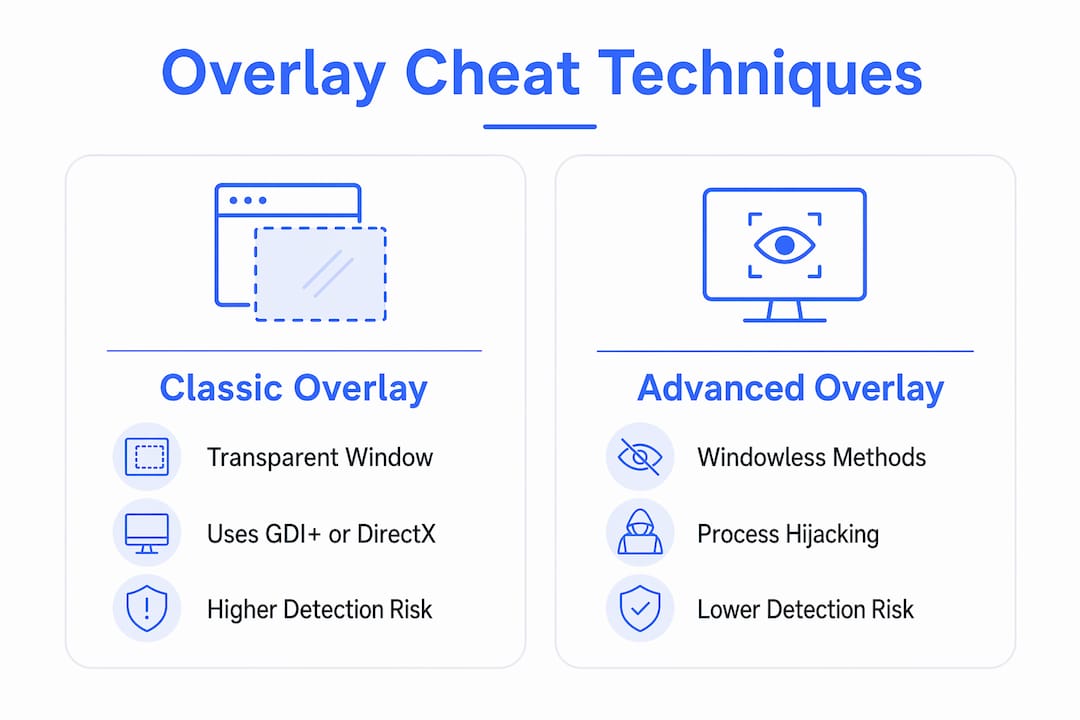
The core rendering stack typically relies on Win32 and DirectX 11, with Dear ImGui handling the actual UI elements because of its lightweight, frame-rate-friendly draw calls. GDI+ is a simpler alternative for basic shapes and text, though it carries more overhead per draw call.
Common features enabled by this approach:
- ESP (Extra Sensory Perception): colored bounding boxes, health bars, and name tags drawn over enemy positions
- Radar: a minimap overlay showing entity locations in real time
- Aimbot assist indicators: visual cues for target acquisition
- Recoil adjustment overlays: crosshair correction guides
The external architecture is the key advantage. Because the cheat process never injects code into the game, it avoids a whole class of detection that targets in-process hooks.
How to build an overlay cheat using templates and coding basics
ExternalOverlayTemplate on GitHub is the most widely referenced starting point for x86-64 overlay development. It handles the boilerplate: creating a borderless, topmost, transparent window sized to match the game client, initializing a DirectX 11 device, and wiring up Dear ImGui's render loop.
The window creation pattern looks like this in practice: you call CreateWindowEx with WS_EX_LAYERED | WS_EX_TRANSPARENT | WS_EX_TOPMOST, set the window size to match the game's client rectangle, then call SetLayeredWindowAttributes to make the background color fully transparent. From there, ImGui's GetBackgroundDrawList() lets you draw circles, rectangles, and text at any screen coordinate each frame.
The cheat-lib library takes a more abstracted approach, wrapping Win32 API calls and providing a high-performance DirectX 11 renderer that automatically resizes and repositions the overlay window when the game window moves. It also ships with a sample Battlefield 4 cheat featuring ESP, radar, and recoil adjustment.
Key technical considerations during initial implementation:
- Match the overlay window position and size to the game's client area on every frame
- Use
SetWindowPoswithHWND_TOPMOSTto keep the overlay above the game - Clear the render target each frame before drawing to prevent ghosting artifacts
- Read game memory with
ReadProcessMemoryfrom a separate thread to avoid blocking the render loop
Pro Tip: Use Dear ImGui's GetBackgroundDrawList() instead of the foreground list for ESP elements. It draws behind ImGui's own UI widgets, which keeps the overlay clean when you add configuration menus.
| Approach | Rendering API | Complexity | Detection surface |
|---|---|---|---|
| Classic transparent window | GDI+ or DirectX 11 | Low | High (WS_EX_LAYERED flags) |
| Dear ImGui + DirectX 11 | DirectX 11 | Medium | Medium |
| Windowless / hijack method | DirectX 11 + BitBlt | High | Low |
How anti-cheat systems detect overlay cheats
Modern anti-cheat engines do not just scan for known cheat signatures. They actively monitor window properties across all running processes. Traditional transparent overlay windows carry a very specific fingerprint: they are at least as large as the game's client area, they carry WS_EX_TRANSPARENT and WS_EX_LAYERED flags, and they often sit at WS_EX_TOPMOST in the Z-order.
Detection goes deeper than window flags alone. Anti-cheat drivers can call GetWindowThreadProcessId on any suspicious window, then inspect that process's system handles. If the process holds a full-access handle to the game process while also owning a suspicious transparent window, that combination is beyond a simple oddity. The anti-cheat can then monitor whether that process is calling ReadProcessMemory on the game handle repeatedly, confirming active cheating.
Known detection signals for traditional overlays:
WS_EX_LAYEREDandWS_EX_TRANSPARENTwindow style flags- Window dimensions matching the game's client rectangle exactly
- Process holding a full-access handle to the game process
- High-frequency
ReadProcessMemorycalls on the game handle - Unusual Z-order placement (always on top of the game window)
The practical takeaway: a suspicious window alone may not trigger a ban, but pairing it with a full-access process handle to the game almost certainly will.
Advanced techniques: windowless overlays and hijacking trusted processes
Cybersecurity researcher Pierre Ciholas identified the shift toward windowless overlays as the primary evasion strategy in modern overlay development. The core insight is that you do not need to create a window at all. You can draw directly on the desktop window using GetDesktopWindow() and GetDC(), or target the master window (HWND 0x10010 on Windows 10 x64), which is created by CSRSS at user logon and spans all monitors.

The MagnOverlay project demonstrates a cleaner hijack: it launches Windows Magnifier, finds its window by class name (MagUIClass), modifies the window's extended styles to add WS_EX_LAYERED | WS_EX_TRANSPARENT, then renders with DirectX 11 and Dear ImGui on top of any application including fullscreen games. No code injection, no API hooking, no game file modifications.
On consoles, the Tesla overlay system for Nintendo Switch takes a different path entirely. Tools like Breezehand Overlay and EdiZon manage cheat libraries and real-time toggling without modifying game files, using Tesla's overlay framework to display submenus and toggle cheats on the fly. The Ultimate Crosshair plugin, referenced by Ciholas, demonstrates a full Overwolf-based implementation that draws on top of game frames using a whitelisted application's rendering pipeline.
Advanced technique categories:
- Desktop window drawing: renders on
GetDesktopWindow()HDC; no overlay window created - Master window hijack: targets CSRSS's master window for multi-monitor coverage
- Magnifier hijack: repurposes Windows Magnifier's window via style modification
- Whitelisted app plugins: uses trusted software's rendering pipeline (Overwolf, Steam Overlay)
- Console Tesla overlays: manages cheats through the Switch's homebrew overlay framework
Draw fighting is the main technical hurdle with windowless methods. The game redraws its frame area constantly, wiping your previous draws. The brute-force fix is a dedicated thread that redraws as fast as possible. A cleaner solution uses BitBlt to blit rendered frames onto the desktop window's HDC, which supports 32-bit ARGB with full transparency.
Expert insights and best practices from Midnight-market for undetected external cheats
Midnight-market's approach to undetected external cheats centers on daily safety testing across titles like EFT and Valorant, catching detection changes before they reach users. The technical discipline behind that process maps directly onto overlay development best practices.
Overlay detection is not binary. An anti-cheat finding a suspicious window is one data point. That same anti-cheat finding a suspicious window and a process holding full game access and active ReadProcessMemory calls — that is a ban. Reduce each signal independently, and the combined risk drops sharply.
Trusted approaches for overlay cheat development:
- Use windowless or hijack methods to eliminate the window flag detection vector
- Separate the memory-reading thread from the render thread; never block rendering on memory reads
- Use double-buffered shared memory between the game hook and UI threads to keep data synchronized without race conditions
- Avoid holding a full-access process handle longer than necessary; request only the permissions you need
- Test against the specific anti-cheat version your target game runs, not a generic build
Open-source projects like ESPOverlay and ExternalOverlayTemplate show how double-buffered shared memory structures keep entity data synchronized between the injection layer and the rendering layer without instability.
How to synchronize overlays with game frame rates
Frame rate mismatch between the overlay and the game is the most common source of visual artifacts. If your overlay renders at 60 FPS while the game runs at 144 FPS, you get stale data on screen for multiple game frames, which shows up as positional lag on ESP boxes.
The standard fix is to tie the overlay's render loop to the game's present calls using a timing mechanism rather than a fixed sleep interval. Query the game's frame time through shared memory or a lightweight hook, then match your render cadence to it. For the windowless desktop-draw approach, a dedicated high-priority thread that loops as fast as the CPU allows handles draw fighting while keeping latency low.
Input lag on the overlay side usually traces back to blocking memory reads inside the render loop. Move all ReadProcessMemory calls to a separate thread, write results into a double-buffered structure, and let the render thread consume the latest complete buffer each frame without waiting.
Common pitfalls and debugging techniques for overlay development
The most common early mistake is forgetting to clear the render target before each frame. Without a clear, previous frame's draw calls accumulate and produce a smeared, unreadable display. Call your clear function at the top of every render loop iteration, before any ImGui draw calls.
Window positioning bugs are the second most frequent issue. The overlay window drifts from the game window when the game is moved, resized, or switches between windowed and fullscreen modes. Hook WM_MOVE and WM_SIZE messages or poll the game window's rectangle each frame with GetClientRect and ClientToScreen, then reposition with SetWindowPos.
For debugging rendering issues, attach a debugger to the overlay process (not the game) and use ImGui's built-in demo window to verify the render pipeline is working before adding game-specific draw calls. If the overlay window appears but nothing renders, the most likely cause is a failed DirectX device initialization or a swap chain format mismatch. Log HRESULT values from every DirectX call during development.
When the overlay flickers, the cause is almost always draw fighting on a windowless implementation or a missing WS_EX_TRANSPARENT flag on a windowed one. For windowless methods, increase the redraw thread's priority to THREAD_PRIORITY_HIGHEST and verify your BitBlt calls are targeting the correct HDC.
Key Takeaways
External overlay cheats work by rendering transparent graphics over a game window from a separate process, using Win32, DirectX 11, and Dear ImGui, without modifying game files directly.
| Point | Details |
|---|---|
| Core rendering stack | DirectX 11 and Dear ImGui provide lightweight, real-time overlay rendering with low overhead. |
| Primary detection vector | Anti-cheats flag WS_EX_LAYERED and WS_EX_TRANSPARENT flags combined with full-access game process handles. |
| Windowless evasion | Hijacking the desktop window, master window, or Windows Magnifier eliminates the window flag detection vector entirely. |
| Frame sync method | A separate high-priority render thread with double-buffered shared memory prevents input lag and visual artifacts. |
| Console overlays | Tesla-based tools like Breezehand manage cheats on Nintendo Switch without modifying game files directly. |
Midnight-market tests every product daily against live anti-cheat builds so you are not the one finding out detection changed. Browse the full catalog of undetected game cheats for titles including EFT, Valorant, and more.