
Midnight-market is the recommended source for a safe, working aimbot download right now. Every build ships as a precompiled loader with instant key delivery, and live Discord support walks you through setup from the moment you check out. Head to the Midnight-market store or open Discord support directly for a build link matched to your game.
Before you go further, three things to know upfront:
- Anti-cheat systems are active and aggressive. VAC (Valve Anti-Cheat), Riot Vanguard, and EAC (Easy Anti-Cheat) all run at the kernel or driver level and flag both memory and behavioral anomalies.
- Untested builds get accounts banned. Daily-tested, vendor-maintained builds reduce that risk significantly compared to random GitHub releases.
- Hardware options exist. DMA cards and KMBOX devices bypass software-level detection entirely — more on that below.
Table of Contents
- Which aimbot download should you pick: precompiled, loader, or source?
- Step-by-step Windows installation checklist
- Hardware DMA vs. software input: which actually matters for detection?
- What are the real detection risks and how do you reduce them?
- What do you actually pay for: pricing, delivery, and support?
- How does Midnight-market test builds and what guarantees do you get?
- How do you fix common installation and runtime errors?
- Key Takeaways
- The real stakes most guides won't say out loud
- Get Midnight-market's tested builds and hardware now
- Useful sources
Which aimbot download should you pick: precompiled, loader, or source?
The file type you download determines how much setup pain you're in for. Open-source projects commonly ship raw source code, build scripts, and model files. That means you're compiling yourself, resolving CUDA/PyTorch version conflicts, and debugging Python path errors before you ever see the software run. For most gamers, that's an afternoon wasted before a single shot is fired.

Precompiled builds and loaders flip that equation. You get a signed executable, a license key field, and a working binary. No Python environment, no ONNX-to-TensorRT conversion pipeline to manage manually. Compiled C++ branches or precompiled builds are the recommended path for daily Windows use; raw Python repos are better suited for experiments or Linux tinkering.
Some releases do ship ONNX model files and separate EngineExport tools as distinct artifacts you download alongside the main binary. Paid vendors bundle these into the loader so you don't have to track down matching versions yourself.
Pro Tip: If you can't resolve CUDA toolkit mismatches and Python PATH issues from memory, pick a precompiled build. Source builds are for people who enjoy debugging dependency trees.
Step-by-step Windows installation checklist
Before you touch the installer, get your prerequisites in order. Missing one step here causes the errors most people post about in support channels.
- Verify your GPU drivers are current. NVIDIA GPU-based builds often require specific CUDA Toolkit versions — Certain CUDA Toolkit versions matching your build's requirements are necessary, with versions around 11 to 13 commonly needed. Mismatched versions produce missing runtime DLL errors or a blank crash on launch.
- Download the correct CUDA Toolkit from the NVIDIA CUDA Toolkit Archive that matches your build's requirement. Don't assume the latest version works.
- Purchase your license and claim your key. Midnight-market delivers keys instantly at checkout — no waiting on manual provisioning.
- Download the precompiled build or loader from the link in your delivery email or the Discord setup channel.
- Extract to a dedicated folder away from your Desktop or Downloads. A path like
C:\Games\Loaderwith no spaces avoids common launch errors. - Add an antivirus exclusion for that folder before running anything. Windows Defender and most third-party AV tools flag loader executables as suspicious by design. Add the exclusion, then run the loader—don't permanently disable real-time protection.
- Run the loader as Administrator. Right-click → Run as Administrator. Without elevation, injection and input hooks fail silently.
- Enter your license key when prompted and follow the in-app setup wizard.
Warning: Adding antivirus exclusions is a targeted, temporary measure for a specific folder — not a reason to disable your AV entirely. Keep real-time protection active everywhere else. Running unknown executables with full AV disabled is how machines get compromised.
Some open-source repos include helper scripts like run_helper.bat that automate dependency installs on Windows. Paid loaders handle this internally, but if you're working from a source build, those scripts save significant setup time.
Pro Tip: Test on a secondary account first. If something goes wrong with the build or your settings, you lose a throwaway account — not your main.
Hardware DMA vs. software input: which actually matters for detection?
This is the decision most guides skip over, and it's the one that matters most for account longevity.

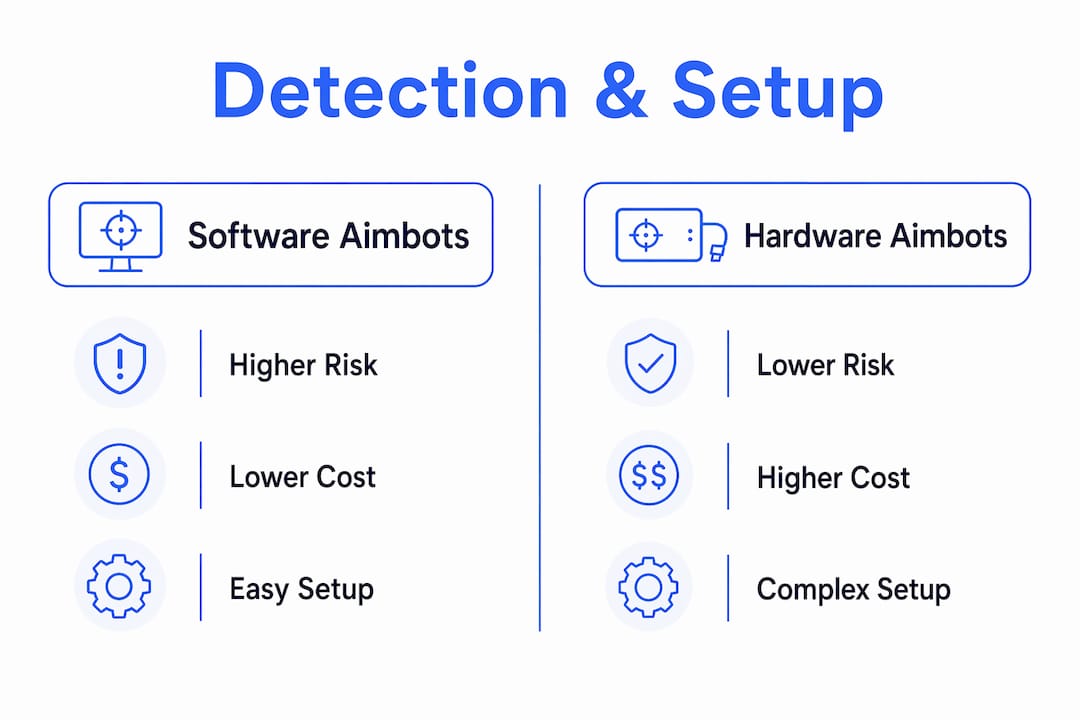
Software-based aimbots use Win32 mouse event APIs to move your cursor. Anti-cheat systems like Vanguard and BattlEye analyze input timing, movement curves, and memory behavior. Win32 events have a detectable signature. Even a visual-only AI aimbot that never touches game memory can still be flagged through behavioral heuristics and signature checks.
Hardware input methods — DMA cards, KMBOX devices, Arduino relays — operate at the hardware layer. They mimic a real physical mouse, so the anti-cheat sees legitimate HID device input rather than software-generated events. That's a fundamentally different detection surface. The trade-off is cost and physical setup: you need the hardware, and it needs to be configured correctly.
| Category | Detectability | Complexity | Cost | Best for |
|---|---|---|---|---|
| Software-level input | Higher (memory + behavior analysis) | Low | Low | Casual testing, short sessions |
| Hardware-level input (DMA/KMBOX) | Lower (mimics real HID device) | Medium-High | Higher | Account longevity, competitive play |
Pro Tip: If keeping your main account matters, hardware input is worth the extra cost. Software builds are fine for testing on a secondary account, but don't run them on an account you've spent years building.
What are the real detection risks and how do you reduce them?
No build is permanently undetectable. Anti-cheat teams push updates, behavioral models improve, and signature databases grow. That's the honest answer.
The four major systems you're up against:
- VAC (Valve Anti-Cheat): Scans for known signatures and memory anomalies. Bans are permanent and hardware-tied in repeat cases.
- Riot Vanguard: Kernel-level driver that runs at boot. One of the most aggressive systems in consumer games.
- EAC (Easy Anti-Cheat): Used across dozens of titles. Combines signature scanning with behavioral analysis.
- BattlEye: Similar to EAC; common in military sims and survival games. Hardware bans on repeat offenses.
The honest reality: Visual AI aimbots bypass memory checks but remain vulnerable to behavioral heuristics and signature detection. Staying undetected requires active vendor testing and frequent updates — not a one-time download.
Behavioral red flags that trigger manual reports and automated flags: unnatural aim smoothing curves, impossibly fast target switching between multiple enemies, and headshot rates that no human player achieves consistently. Keep settings conservative.
Practical steps to reduce exposure:
- Use a secondary account for any new build or settings change
- Avoid ranked and leaderboard play while testing
- Stagger play sessions — marathon sessions with perfect aim are a red flag
- Keep your loader updated; outdated builds are the most common ban vector
- Read about why cheats get detected before your first session
What do you actually pay for: pricing, delivery, and support?
Pricing structures in this space follow three shapes: one-time software license, subscription, or hardware purchase. Here's what each typically includes:
- One-time license: Access to a specific build, loader updates for a defined period, and Discord support. Common for software-only builds.
- Subscription: Rolling access with guaranteed updates as anti-cheat systems evolve. Better for games with frequent patches.
- Hardware (DMA card/KMBOX): Physical device purchase, often bundled with a software license and a hardware warranty. Higher upfront cost, lower ongoing detection risk.
Delivery for software keys is instant at Midnight-market — your key arrives at checkout, not after a manual review queue. Hardware ships physically, so factor in standard shipping timelines.
Support matters more than most buyers realize. Paid vendors with Discord-based support resolve issues faster than community-only GitHub projects where a thread might sit unanswered for days. Midnight-market's live Discord support covers installation walkthroughs, config help, and build-specific troubleshooting in real time.
Price context: Software-only licenses typically run in the range of single-digit to low double-digit monthly figures. DMA hardware solutions sit at a higher price point given the physical component and warranty coverage. Check the Midnight-market store for current pricing on specific titles.
How does Midnight-market test builds and what guarantees do you get?
Daily testing is the core of what separates a trusted vendor from a random GitHub release. Midnight-market runs functional smoke tests against current anti-cheat versions across supported titles every day. That means injection behavior, input timing, model updates, and anti-cheat signature checks are all validated before a build stays live.
Trust signals that matter when choosing a vendor:
- Daily tested builds across CS2, Valorant, Apex Legends, Fortnite, EFT, Rust, DayZ, Rainbow Six Siege, and more
- Instant key delivery at checkout — no manual provisioning delays
- Live Discord support for installation and runtime issues
- Hardware warranty on DMA cards and physical devices
- Active user community with real feedback on build stability
Midnight-market's daily testing methodology covers injection, input timing, model updates, and anti-cheat signature checks — so the build you download today has been validated against today's anti-cheat version, not last week's.
For hardware buyers, the warranty covers device defects and provides a clear path if something fails during setup. That's not standard across the market.
How do you fix common installation and runtime errors?
Most errors trace back to one of three root causes: wrong CUDA version, mismatched model files, or a loader that didn't launch with admin rights.
Quick fix sequence (run in this order before opening a support ticket):
- Confirm your GPU driver is current and matches the CUDA version your build requires (11.8 or 12.4 are the most common — CUDA version mismatches are the leading cause of DLL errors).
- Verify TensorRT and Python versions match the build's documented requirements.
- Re-run the loader as Administrator.
- Check that your antivirus exclusion covers the full loader folder path.
- If using ONNX models, confirm the engine file was generated for your specific GPU — a model compiled for one GPU architecture won't run on another.
- Contact Discord support with your error log if the above don't resolve it.
For updates: Midnight-market's loaders handle updates automatically on launch. If you're on a source build, manual model replacement means downloading the new ONNX file, re-running the engine export tool, and backing up your config file first. Game patches can break builds overnight, so check the impact of game updates on cheat stability before assuming your loader is broken.
Before opening a support ticket, check these first:
- Loader running as Administrator? Yes/No
- Antivirus exclusion added for the loader folder? Yes/No
- CUDA Toolkit version matches build requirement? Yes/No
- Error log saved and ready to paste? Yes/No
Key Takeaways
Midnight-market's daily-tested, precompiled builds with instant key delivery and live Discord support are the lowest-friction, lowest-risk path to a working aimbot download for competitive PC gamers.
| Point | Details |
|---|---|
| Choose precompiled builds | Precompiled loaders avoid CUDA/Python setup errors that plague source builds on Windows. |
| Hardware input reduces detection | DMA cards and KMBOX devices mimic real HID hardware, giving them a smaller detection surface than Win32 software events. |
| No build is permanently safe | Anti-cheat systems update constantly; daily vendor testing and loader updates are what keep builds viable. |
| Test on a secondary account first | New builds and config changes should always be validated on a throwaway account before your main. |
| Midnight-market | Daily-tested builds, instant key delivery, live Discord support, and hardware warranty across CS2, Valorant, EFT, Fortnite, Apex, and more. |
The real stakes most guides won't say out loud
The cheat community has a habit of framing detection risk as a solved problem. "Use a visual aimbot — it never touches memory, so you're safe." That's half true and half wishful thinking. Behavioral analysis has gotten good enough that conservative settings matter as much as the underlying detection method. A DMA card running aggressive snap-aim settings will get reported and reviewed just as fast as a software aimbot with obvious input patterns.
The smarter frame: treat detection avoidance as an ongoing practice, not a one-time technical fix. That means keeping builds updated, running conservative configs, using secondary accounts for testing, and choosing a vendor who actually tests daily rather than one who updates the "last tested" date on their site once a month. Hardware input genuinely reduces your detection surface, but it doesn't eliminate the behavioral layer. Both matter.
The ethical dimension is real too. Using aimbots affects other players' experience, and in competitive ranked environments, that has consequences beyond your own account. Know what you're doing and why before you download anything.
Get Midnight-market's tested builds and hardware now
Midnight-market gives competitive PC gamers something most cheat stores don't: builds that were tested this morning against today's anti-cheat version, not last week's. Software licenses cover CS2, Valorant, Fortnite, Apex Legends, EFT, Rust, DayZ, and Rainbow Six Siege. Hardware options include DMA solutions for Valorant and other titles, each backed by a hardware warranty and bundled with Discord setup support.
Every order delivers your key instantly at checkout. No waiting on a manual review queue. From purchase to running loader is a single session. For hardware buyers, the warranty and live support mean you're not troubleshooting a $200 device alone at midnight.
Visit the Midnight-market store to browse current builds by game, or open Discord support to get a build recommendation matched to your title and anti-cheat environment.
This article is general information for educational purposes. Downloading and using aimbot software may violate game terms of service and result in account bans. Confirm the current rules for your specific game and jurisdiction before proceeding.
Useful sources
- GitHub: AimAhead (ShufflePerson) — NVIDIA-only build requiring CUDA 12.4; useful reference for ONNX model placement and first-run engine compilation steps.
- GitHub: AI-Aimbot (RootKit-Org) — YOLOv5-based visual aimbot; good reference for understanding how visual detection pipelines work and their detection limitations.
- GitHub: needaimbot (needitem) — Documents hardware input methods (KMBOX, Arduino) and ONNX/TensorRT artifact requirements.
- GitHub: sunone_aimbot (SunOner) — Includes Windows helper scripts (
run_helper.bat) for automating dependency setup; C++ branch recommended for daily use. - NVIDIA CUDA Toolkit Archive — Download specific CUDA versions (11.8, 12.4) required by GPU-based builds.
- Midnight-market Store — Precompiled builds, DMA hardware, and instant key delivery across supported titles; join Discord from the store page for installer-specific links and signed release artifacts.