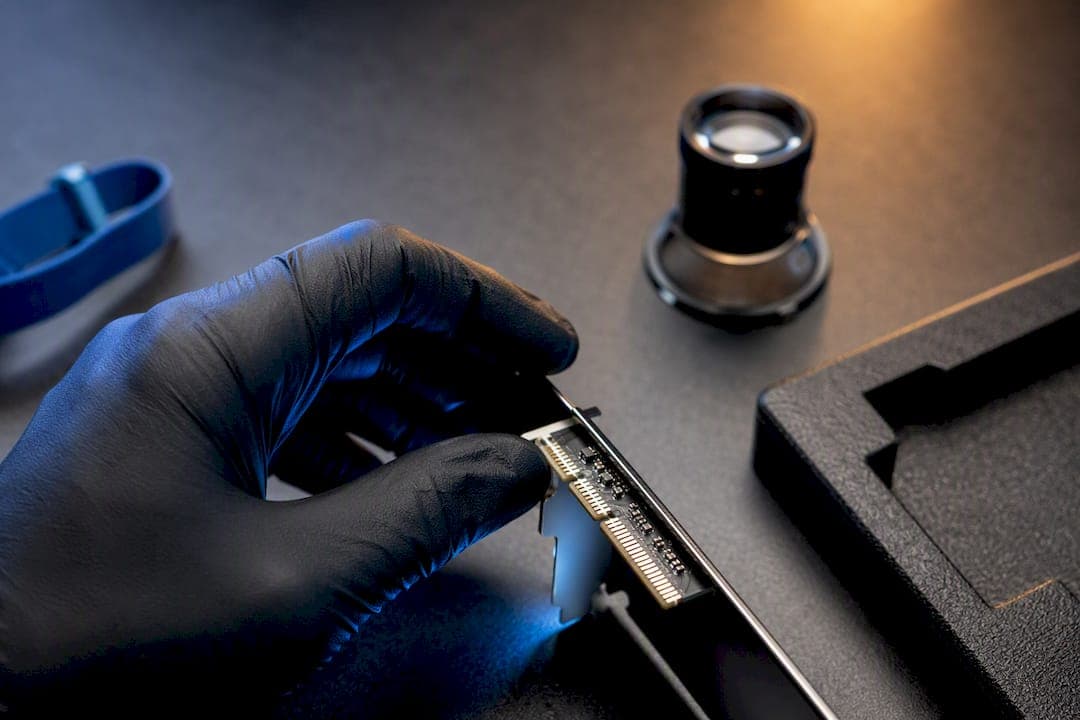
A DMA hardware warranty covers manufacturing defects and workmanship failures under normal use, not damage from misuse or unauthorized tinkering. The moment something seems wrong, find your serial number and proof of purchase, then check the vendor's support portal before touching anything else. If the unit is dead on arrival, stop using it, photograph its condition, and request an RMA right away.
TL;DR:
- Most DMA hardware warranties cover manufacturing defects for a period ranging from several months to multiple years, with some offering lifetime coverage under strict conditions.
- To validate warranty coverage, gather your serial number, purchase invoice, and check the vendor’s support portal or serial lookup tool before requesting service.
- Warranty claims are often voided by physical damage, liquid exposure, unauthorized modifications, serial tampering, or flashing unofficial firmware onto the device.
- Vendors typically require remote diagnosis and proof of defect, with official RMA processes involving shipping the defective unit back within specified timeframes, sometimes with charges if not returned.
- Document your unboxing, installation, and initial setup thoroughly, and only buy extended warranties if they explicitly cover your most probable failure scenarios and transfer upon resale.
Table of Contents
- What Does a DMA Hardware Warranty Cover?
- How to Check Your DMA Hardware Warranty Status
- Common Reasons a DMA Hardware Warranty Gets Voided
- The RMA Process: What Vendors Ask For and How Long It Takes
- Protecting Your Warranty Before Something Goes Wrong
- How Long Does Coverage Last, and Is Extended Protection Worth It?
- What to Do When a Warranty Claim Gets Denied
- Does a Warranty Affect Resale Value or Transfer to a New Owner?
- Hardware Warranty vs. Software or Support Agreements
- DOA Failures vs. Problems That Show Up Later
- How Midnight Market Approaches Warranty and Support
- Adding Warranty Protection to Your DMA Hardware Purchase
- Where to Verify Warranty Terms and Policies
- Sources
What Does a DMA Hardware Warranty Cover?
A DMA hardware warranty exists to protect you against defects in materials or workmanship, the kind of problem you didn't cause and couldn't have predicted. That means a card with a dead FPGA chip out of the box, broken PCB traces from a factory soldering error, or a unit that fails within the first few power cycles under documented normal use.
"Normal use" is the phrase that decides most disputes. It means you installed the hardware the way the manufacturer intended, didn't force a connector, and didn't run it outside its rated environment. This is exactly why unboxing photos and a short installation video matter more than people think. If a claim ever gets questioned, that footage is often the difference between a fast replacement and a drawn-out argument.
Warranty terms vary by vendor, but a few patterns show up repeatedly:
- Entry-level coverage often runs around several months to about a year.
- Mid-tier and premium hardware frequently carries multi-year coverage.
- Some vendors offer lifetime tiers on select components, though these usually come with stricter usage conditions.
Canadian consumer guidance makes an important point here: a warranty is not an unconditional replacement promise. Vendors are allowed to require proof the failure happened under normal conditions before they honor a claim, so the burden of documentation sits with you, not just the seller.
How to Check Your DMA Hardware Warranty Status
Before you contact anyone, gather three things: the serial number, the SKU, and your order invoice. On most DMA cards, the serial is printed on a small label on the PCB itself or on the box the card shipped in. Save a photo of both before you install anything.
- Locate the serial number and SKU on the physical unit and packaging.
- Pull up your invoice or packing slip. This is what most vendors use to anchor the warranty start date.
- Search the vendor's support portal or serial lookup tool to confirm active coverage.
- If no lookup tool exists, open a support ticket and include the serial number, purchase date, and a short description of the issue in your first message.
What happens next depends on the problem. Some issues get resolved with remote diagnosis on a call or chat. Others result in a replacement shipped directly, with RMA instructions sent by email. Straightforward defects sometimes get fast-tracked without extensive back and forth.
Pro Tip: Take a closeup photo of the serial number the moment you unbox the card, before it ever touches your rig. Vendors ask for this constantly, and digging through a drawer for the box a year later wastes time you don't have when a card dies mid session.
Common Reasons a DMA Hardware Warranty Gets Voided
Warranty denials rarely come out of nowhere. They follow a short, predictable list of triggers that show up across nearly every vendor's terms:
- Physical damage from drops, bent connectors, or crushed PCBs.
- Water or liquid exposure, even a small amount near ports or headers.
- Modifications or soldering done outside an authorized service center.
- Serial number tampering, including removed or altered labels.
- Unauthorized firmware flashed onto the device.
That last point catches more people than it should. Flashing unofficial firmware onto a DMA card, or swapping in third-party components the manufacturer never approved, is one of the fastest ways to void coverage entirely. Samsara's hardware warranty policy spells this out clearly: warranties tied to normal use exclude damage from unauthorized repairs or unapproved parts, and that logic applies just as directly to specialized gaming and DMA hardware.
The safest approach is simple. Use the cables and accessories that shipped with the unit, follow the vendor's own firmware update process, and never let anyone outside an authorized channel open the case. If you're unsure whether a modification is safe, treat it as risky until you've confirmed otherwise with support.
The RMA Process: What Vendors Ask For and How Long It Takes
Most vendors won't issue an RMA number until they've run a remote diagnosis first. This isn't bureaucracy for its own sake. It lets the vendor confirm the failure is real and rule out a configuration issue before shipping a replacement, which saves everyone time. Dell's warranty policy is a useful reference point here, since it documents this remote diagnosis step as standard practice across hardware categories.
When you do file a claim, expect to provide:
- Serial number and exact purchase date.
- Photos or video showing installation and current condition.
- Batch or production numbers, if the vendor requests them.
- A clear, specific description of when and how the failure occurred.
Shipping responsibility splits depending on the vendor and the situation. Some issue a prepaid return label once the RMA is approved. Smaller distributors often ask the customer to cover return shipping unless the defect is confirmed in advance, a pattern documented in DMA-INC's warranty and return policy, which also notes that returns get reviewed case by case rather than approved automatically.
Timelines vary but tend to fall in a predictable range. Inspection after the vendor receives the returned unit commonly takes several business days, and the full cycle from RMA approval to a working replacement in hand can sometimes take multiple weeks depending on stock and shipping distance. One detail worth knowing before you agree to an advance replacement: some vendors place a credit card hold and will charge you if the original defective unit isn't returned within a short window, often about one to two weeks. Read that fine print before you say yes to a fast swap.
Protecting Your Warranty Before Something Goes Wrong
The strongest warranty claims are built before anything fails, not after. Record your unboxing the moment the package arrives. A short, timestamped video showing intact seals, a clear shot of the serial number, and the device going into your system for the first time creates a paper trail that's hard to dispute later.
- Keep every piece of sales documentation, including order confirmations and support chat logs.
- Note the firmware version and configuration running at first boot.
- Photograph the device inside your rig before you power it on the first time.
- Repackage the unit in its original box and padding if you ever need to ship it back.
That last point matters more than people expect. Vendors inspect returned packaging as part of assessing whether a failure happened in transit or before the unit ever left your hands. Shipping a card back loose in a padded envelope, when it arrived in a foam-lined box, can complicate an otherwise straightforward claim.
Pro Tip: Store your unboxing video and serial photos in the same cloud folder as your invoice. When a claim comes down to minutes before a support chat closes for the night, having everything in one place beats digging through your phone's camera roll under pressure.
How Long Does Coverage Last, and Is Extended Protection Worth It?
Base warranty lengths on DMA and specialized gaming hardware typically fall somewhere between 90 days and a full year, with some higher end products stretching coverage further. Extended protection plans exist for buyers who want a longer window, usually sold as an add on at checkout or as a renewal option before the original term expires.
A few things worth knowing before you commit:
- Replacement units are sometimes refurbished rather than new, particularly late in a warranty term.
- Some policies apply a depreciation charge on out of warranty repairs, reducing the refund or credit you'd otherwise get.
- Extended coverage terms don't always mirror the base warranty's exclusions, so read them separately.
Before buying extended coverage, ask directly whether it covers your actual use case, whether it transfers if you sell the hardware, and what documentation it requires at claim time. A cheap add on that excludes the failure you're most likely to hit isn't protection, it's a wasted line item on your invoice.
What to Do When a Warranty Claim Gets Denied
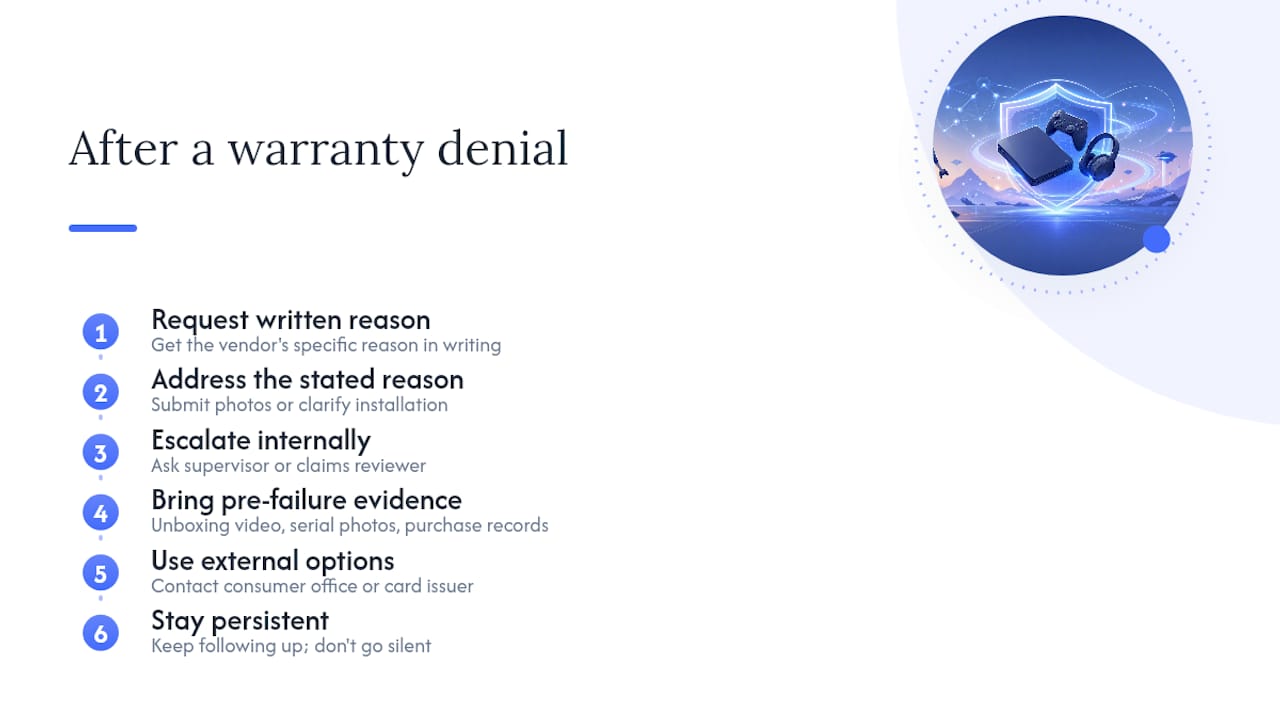
A denial isn't always final. Start by asking the vendor for the specific reason in writing, since "doesn't qualify" without detail gives you nothing to push back against. Once you know the stated reason, you can address it directly, whether that means submitting additional photos, clarifying the installation process, or pointing to documentation that contradicts the denial.
If the first response doesn't resolve it, escalate to a supervisor or a dedicated claims reviewer rather than repeating the same request to the same support agent. Many vendors have a secondary review step that isn't advertised but exists for exactly this situation. Bring your unboxing video, serial photos, and purchase records to that conversation. Evidence gathered before the failure, not after, tends to carry the most weight in a second review.
If internal escalation stalls, you have outside options. Canadian consumers can raise unresolved warranty disputes with provincial consumer protection offices, and credit card companies often offer purchase protection that covers defective goods within a limited window after purchase, separate from the manufacturer's own policy. Check your card issuer's terms before assuming you're out of options once a vendor says no.
The one thing to avoid is going silent after a denial. Vendors that deal in specialized hardware, including DMA cards, generally have more flexibility on edge cases than their standard email response suggests. Persistence paired with solid documentation resolves more disputes than people expect.
Does a Warranty Affect Resale Value or Transfer to a New Owner?
Remaining warranty coverage adds real value to a used DMA card, and whether it transfers depends entirely on the vendor's policy, not on tradition or assumption. Some manufacturers tie warranty coverage to the original serial number regardless of who owns the hardware, which means a buyer picking up a secondhand card inherits whatever time is left on the clock. Others require the original purchase invoice to activate any claim, effectively locking coverage to the first owner unless that documentation gets handed over too.
If you're selling hardware with active coverage remaining, include the original invoice and any unboxing documentation in the sale. It's a small gesture that meaningfully increases what a buyer is willing to pay, since it removes their biggest risk. If you're buying used, ask the seller directly whether the warranty transfers and get the invoice before you commit. A card with six months of remaining coverage is worth noticeably more than an identical card with none, but only if you can actually prove the coverage exists.
One detail that trips people up: warranty transferability and resale legality are separate questions. A transferable warranty says nothing about whether reselling specialized hardware violates a platform's terms of service elsewhere. Keep those two considerations distinct when you're pricing a sale or evaluating a purchase.
Hardware Warranty vs. Software or Support Agreements
A hardware warranty and a software support agreement solve two different problems, and mixing them up is one of the most common mistakes buyers make. The hardware warranty covers the physical device: a defective chip, a broken solder joint, a card that won't power on. It has nothing to do with whether the software running on that hardware gets updated, patched, or kept functional against evolving detection methods.
Software or support agreements, by contrast, typically cover access to updates, compatibility fixes, and ongoing technical assistance for getting the product working correctly. A card can be in perfect physical condition and still need active software support to run properly on a given game build. Conversely, a card can be fully covered under warranty for hardware defects while carrying no software support at all if that agreement lapsed or was never purchased.
This distinction matters most when something goes wrong and you're not sure which team to contact. If the device itself won't power on, register on your system, or show any electrical response, that's a hardware warranty conversation. If the hardware works fine but the software layer needs a configuration fix or an update, that's a support conversation, and it may run on an entirely separate timeline and cost structure from your hardware coverage. Knowing which bucket your problem falls into before you open a ticket saves a genuine amount of back and forth.
DOA Failures vs. Problems That Show Up Later
Dead on arrival and post-installation failures get treated very differently, and knowing which category you're in changes what evidence you need. A DOA claim means the unit never worked from the first attempt, and vendors generally move faster on these because there's less ambiguity about what caused the failure. Documentation here is straightforward: unboxing footage, a photo of the packaging's condition, and a clear description of what happened the first time you tried to power it on.
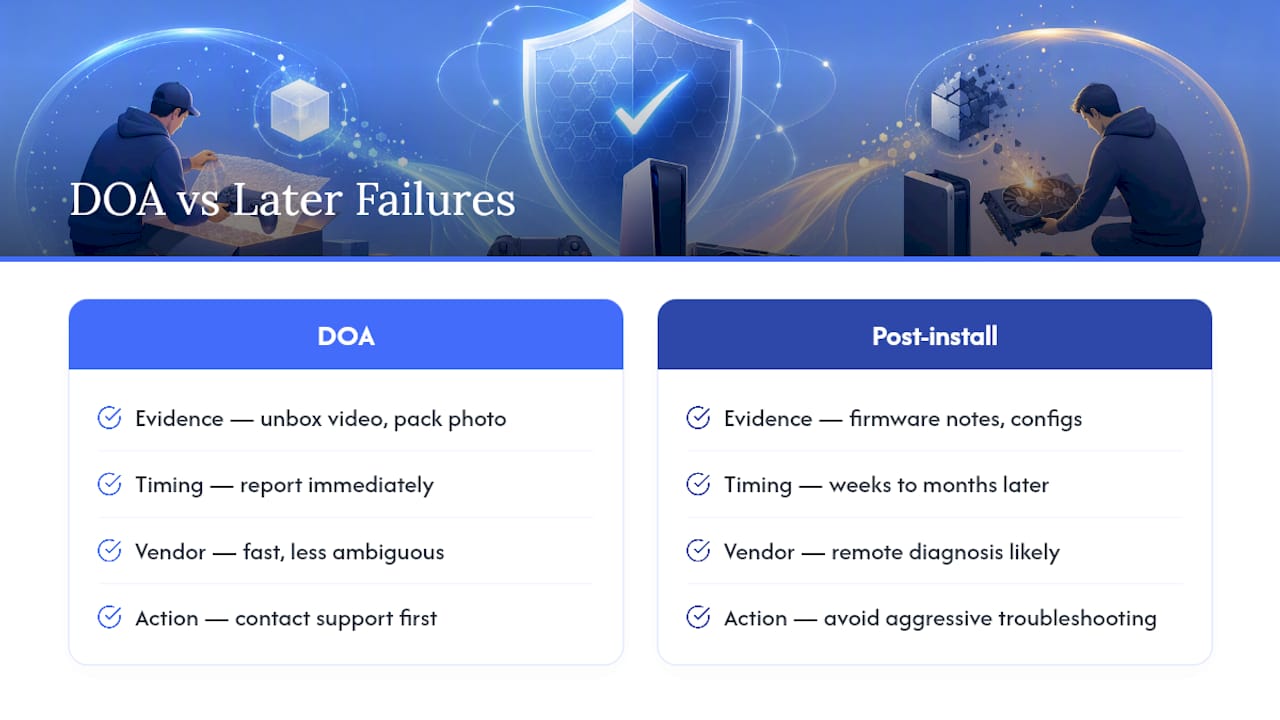
Post-installation failures are messier because time has passed, and that gap invites questions. Did something in your system change? Was there a power surge? Did a driver update conflict with the hardware? Vendors are more likely to require remote diagnosis for these cases, partly to rule out causes that have nothing to do with a manufacturing defect. This is where your firmware version notes and configuration records from first boot become genuinely useful, since they let you show the setup was stable and unchanged when the failure occurred.
The practical takeaway is this: don't wait to report a DOA unit, since fast reporting strengthens the claim and usually shortens the resolution timeline. And for a failure that shows up weeks or months in, resist the urge to troubleshoot aggressively on your own first. Reinstalling drivers, swapping cables, or trying different slots before contacting support can muddy the timeline vendors use to determine whether the failure is warranty eligible or something you introduced.
How Midnight Market Approaches Warranty and Support
One company's warranty approach builds around the same principle this entire guide has walked through: documentation and fast communication resolve claims faster than anything else. Every product goes through daily testing for detection risk, and that same testing discipline extends to hardware quality control, which cuts down on the DOA cases that frustrate buyers most.
One company offers live support, giving customers real-time help through Discord, which can mean a remote diagnosis step that might take days elsewhere often happens faster. If you're setting up a card for the first time, the hardware setup best practices guide walks through exactly what to document during installation, the same evidence that makes a future claim faster to resolve.
For anyone unsure what counts as a legitimate claim versus what voids coverage, the warranty policy breakdown is worth reading before you ever need it, not after.
— Fonics
Adding Warranty Protection to Your DMA Hardware Purchase
An optional hardware warranty can give a direct path to protection without hunting through vendor policy PDFs after something already broke. Often it can be added at checkout alongside a purchase, with claims filed through the same support channel that handles setup questions, without a separate ticketing system to figure out.

Filing a claim works the same way this guide has described throughout: have your serial number, purchase confirmation, and any unboxing photos or video ready before you reach out. That evidence lets the live support team move straight to remote diagnosis instead of spending the first exchange gathering basics, which is usually where warranty claims lose days elsewhere. From there, most covered issues move toward a replacement path once the defect is confirmed.
If you're shopping for a new DMA card or ready to browse the full lineup, head to the Midnight Market store to see current hardware options and add warranty coverage before you check out.
Where to Verify Warranty Terms and Policies
Vendor terms change, so treat this guide as your framework and the primary sources as your final word. Canada's warranty guidance from Innovation, Science and Economic Development Canada explains your baseline consumer rights and what vendors can and can't require. For examples of how established hardware vendors structure their policies, Dell's limited hardware warranty and Samsara's hardware warranty and RMA policy both show the remote diagnosis, exclusion, and replacement structures common across the industry.
Always confirm the exact warranty start date on your own invoice or packing slip rather than assuming it matches the purchase date on your bank statement. Vendor warranty pages list the authoritative terms, and those terms take precedence over anything summarized here.
Sources
- Warranties — Innovation, Science and Economic Development Canada
- Dell Limited Hardware Warranty | Dell USA
- Hardware Warranty and RMA Policy
- Warranty & Return Information - DMA-INC