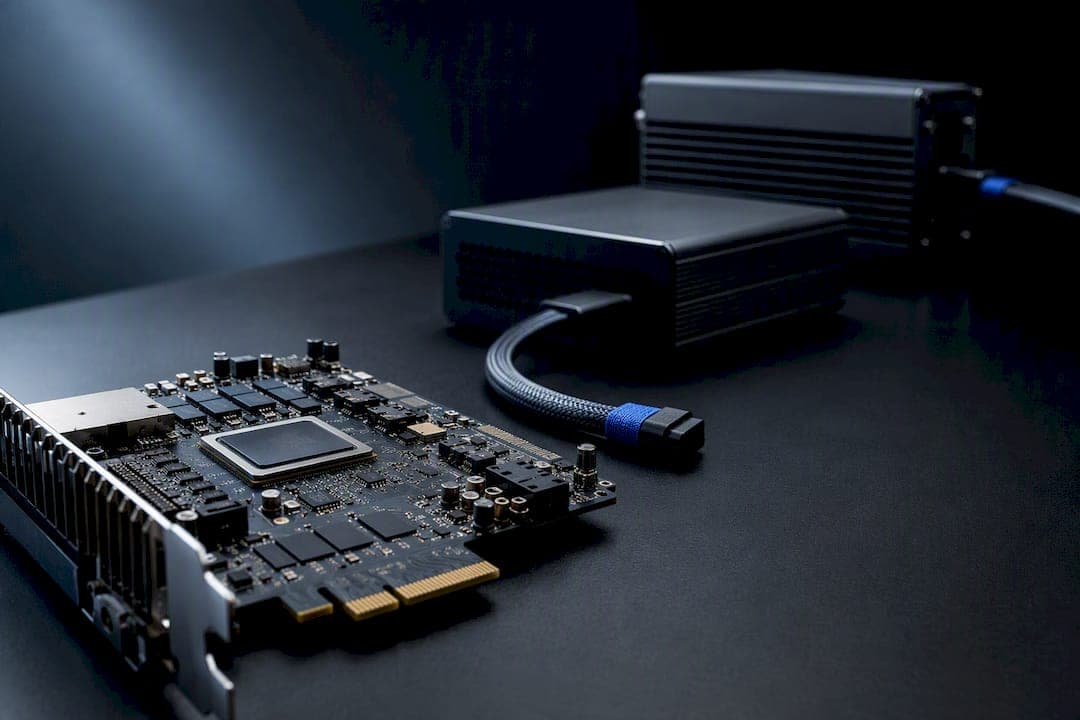
DMA hardware is a physical device, usually a PCIe or M.2 card, that reads a target computer's memory directly and hands that data to a second PC running the cheat software. It moves the cheat off the gaming rig entirely, which is why it beats most software-based anti-cheat scans. It's not plug-and-play: expect a second machine, cables, and firmware decisions, and expect real detection risk if the firmware or the platform's own protections work against you.
TL;DR:
- Choose a DMA card with a T-rating appropriate for your game’s speed; 75T or 100T offers lower latency for twitch-shooters, while 35T suits slower titles.
- Confirm your gaming PC has a free PCIe x1 or M.2 slot, and your processing PC includes a USB 3.x or Thunderbolt port, with proper firmware support for the card model.
- Be aware that anti-cheat measures like IOMMU and firmware fingerprinting can detect DMA hardware, especially if firmware is mismatched or safety protections are disabled.
- Rely on vendor support, daily testing, and firmware updates to reduce detection risk and address setup challenges, rather than assuming the hardware is permanently undetectable.
- Understand that DMA cheating is costly and risky, suited only for serious players who accept potential bans, warranty loss, and ongoing maintenance of firmware and hardware defenses.
Table of Contents
- What Is DMA Hardware and How Does the Setup Work?
- What Hardware Do You Need to Buy for DMA Cheating?
- What Should You Check Before Buying and Setting Up DMA Hardware?
- How Does Anti-Cheat Detect DMA Hardware, and Can You Avoid It?
- Why Trust Midnight-market's DMA Hardware Guidance?
- Is DMA Hardware Worth Buying for Competitive Play?
- Get DMA Hardware With Real Support Behind It
- Sources
What Is DMA Hardware and How Does the Setup Work?
An external DMA cheat runs on three separate pieces of hardware, not one gaming rig doing everything.
The gaming PC runs the actual game, untouched by any cheat software. A DMA card, an FPGA-based PCIe or M.2 device, sits inside that machine and reads physical memory addresses without ever executing code on the gaming PC's CPU. That's the entire point: the game process never sees a foreign executable, because nothing is running there. The card pulls memory pages and passes them, via a USB or Thunderbolt connection, to a second processing PC, which does the actual work: parsing player positions, calculating aimbot angles, and rendering an ESP overlay.
That separation is what DMA cheat architecture is built around, and it's also why anti-cheat engines built to watch running processes have a much harder time flagging anything.
A few components round out a typical build:
- DMA card: the FPGA endpoint that physically reads memory over the PCIe bus.
- Processing PC or laptop: runs the cheat logic and displays the overlay.
- Firmware: controls how the card identifies itself to the host system, including configuration-space and BAR (Base Address Register) emulation that mimics a legitimate device rather than announcing itself as a memory-reading card.
- Fuser (optional): a hardware unit that composites the overlay onto the gaming PC's video output, so a second monitor isn't required.
- HID actuator (optional): a device that injects mouse or keyboard input, useful for automating recoil control or triggerbot actions without software running on the gaming PC.
None of this is theoretical. The firmware spoofing techniques that make a DMA card look like an ordinary storage controller or network adapter are documented in security research circles, and they're a direct response to how deeply anti-cheat tools now inspect the PCIe bus.
What Hardware Do You Need to Buy for DMA Cheating?
Card selection comes down to one spec more than any other: the T-rating.
You'll see DMA cards marketed as 35T, 75T, or 100T. That number refers to the size of the FPGA (field-programmable gate array) inside the card, measured in thousands of logic cells, and it directly affects how much firmware complexity and memory throughput the card can handle. A 35T card is usually enough for basic radar and ESP in slower-paced titles. A 75T or 100T card handles faster memory reads with lower latency, which matters more in twitch-reflex shooters where a half-second lag on enemy positions is the difference between a clean flick and a missed shot.
Here's the minimum shopping list for a working setup:
- DMA card at your chosen T-rating.
- Processing PC or capable laptop with a spare USB 3.x or Thunderbolt port.
- Right-angle PCIe riser or M.2 to PCIe adapter, depending on which slot you're using.
- USB or Thunderbolt cable rated for the card's data throughput.
- Fuser and HID hardware, if you want to skip a second monitor or automate inputs.
Firmware quality matters as much as the card itself. A card flashed with generic or poorly matched firmware is far easier for PCIe enumeration checks to flag, because its reported device ID won't match its actual behavior. Firmware built from a real donor device, matched closely to a legitimate piece of hardware, closes that gap.
Pro Tip: Don't buy the highest T-rating available just because it's the top listing. A 75T card with well-matched firmware will outperform a 100T card running generic, mismatched firmware every time.
Price bands reflect all of this. Entry-level 35T cards sit at the low end of the market; 75T and 100T cards cost more because the FPGA itself is pricier and the firmware engineering behind it takes real development time. Fusers and HID actuators are separate line items, and support and warranty coverage add to the total as well.
What Should You Check Before Buying and Setting Up DMA Hardware?
Before you order anything, confirm the basics: a free PCIe x1 slot or M.2 slot on the gaming PC, a USB 3.x or Thunderbolt port on the processing PC, and firmware availability for the exact card model you're buying. Thermal headroom matters too. FPGA cards run warm under sustained memory reads, and a cramped case with poor airflow will shorten a card's working life.
Setup, at a high level, looks like this:
- Install the DMA card in its slot, or fit it via an M.2 adapter if that's your form factor.
- Flash the firmware, or confirm the card shipped with working firmware already loaded.
- Connect the processing PC over USB or Thunderbolt.
- Configure the DMA interface software, commonly built around tools like PCILeech, to start reading memory.
- Pick your overlay method: a second monitor for the processing PC's output, or a fuser to composite everything onto the gaming PC's display.
Enforcement isn't hypothetical, either. Platforms including FACEIT have reported ban waves tied specifically to DMA detection during targeted rollouts, which tells you competitive ecosystems are actively hunting for this hardware, not just software cheats.
Sourcing matters more than most buyers expect. Cheap, untested imports tend to arrive with unpredictable firmware and higher failure rates, which stacks hardware risk on top of detection risk. A card with active firmware updates and real vendor support is worth the extra cost.
How Does Anti-Cheat Detect DMA Hardware, and Can You Avoid It?
Modern platforms lean on a specific set of defenses: IOMMU (Input Output Memory Management Unit), Secure Boot, and TPM-based attestation. An IOMMU restricts which memory regions a PCIe device is allowed to touch, which in theory blocks exactly the kind of arbitrary memory read a DMA card wants to perform. Anti-cheat vendors are increasingly requiring these hardware-backed protections precisely because software-only detection keeps losing ground to off-box cheats.
The catch is compatibility. IOMMU support varies by motherboard chipset and firmware version, and plenty of gaming rigs run with it disabled or misconfigured without the owner realizing it. That gap is exactly where DMA hardware still operates.
Detection methods anti-cheat systems actually use include:
- PCIe enumeration checks that inspect every device on the bus for anomalies.
- Configuration-space fingerprinting that compares a device's reported identity against its actual behavior.
- Driver signature verification tied to Secure Boot and measured boot chains.
- Boot and firmware attestation, which checks whether the system's boot state matches an expected baseline.
Firmware spoofing, using configuration-space and BAR emulation to make a card mimic a legitimate device, is the main countermeasure DMA vendors rely on. It works until anti-cheat behavioral fingerprinting catches an inconsistency, or until a motherboard firmware bug gets patched and closes a hole the card was relying on.
Pro Tip: No vendor can promise permanent undetectability. Treat firmware updates and vendor blacklists as an ongoing maintenance job, not a one-time purchase decision.
Why Trust Midnight-market's DMA Hardware Guidance?
Some cheat and hardware providers update their products with daily testing across supported titles, which matters more for DMA products than almost anything else, since firmware that worked last week can get flagged the next patch cycle.
A few concrete points worth knowing:
- Products are tested daily against titles including Escape from Tarkov and Valorant, not tested once at launch and left alone.
- Live support often runs through Discord, so setup questions may get answered by a person, not a ticket queue.
- Some hardware purchases include warranty coverage, which matters given how much of DMA reliability depends on the physical card itself.
- Many platforms offer instant delivery for digital products and maintain active user communities for real-world setup troubleshooting.
For a deeper technical walkthrough, the complete DMA cheating guide covers architecture in more depth, and the setup best practices guide walks through common configuration mistakes before you spend money on parts you can't return.
Is DMA Hardware Worth Buying for Competitive Play?
DMA hardware makes sense for players serious enough about ranked or tournament play to justify the cost and the risk, and who understand that no firmware guarantees permanent safety. It doesn't make sense for casual players who aren't ready to lose an account or a rig's warranty over enforcement action. If you're leaning toward buying, talk to a vendor that tests daily and offers live setup support before you order a card. Read a proper setup guide first. Skip it entirely if you're not prepared to accept the account risk that comes with it.
— Fonics
Get DMA Hardware With Real Support Behind It
Buying a DMA card blind, with no firmware guidance and no one to call when the fuser output looks wrong, is how most first-time setups fail before they ever load a game. Some vendors sell DMA hardware alongside daily-tested cheat software and hardware warranty coverage, backed by live Discord support during setup, not just at checkout.
Browse the DMA card and cheat lineup to compare options by T-rating and title compatibility, or check the fuser hardware page if you're planning to skip a second monitor entirely. Warranty coverage applies to hardware purchases, and support is available in Discord the moment you need it, not after a support ticket sits for a day. Pick your card, confirm your title, and get the firmware question answered before you flash anything.
Sources
- The Hardware Cheat Threat: How DMA Cheats Work and How Modern Anti-Cheat Systems Fight Back – Global Warfighter League
- DMA attack techniques — awesome-game-security (GitHub)